
Aqilla operates on two VAT reporting modes:
-
Non-MTD Report: Generated based on locally configured VAT periods in Aqilla.
-
MTD Report: Generated based on VAT periods defined by HMRC obligations when Making Tax Digital (MTD) is enabled.
When MTD is enabled, VAT 100 reports exclude Non-MTD reports for HMRC submissions. However, an error may occur if both an MTD and a Non-MTD report exist for the same VAT period.
This issue is compounded if the VAT periods differ (e.g., HMRC MTD reports use quarterly periods, while Non-MTD reports in Aqilla may use bi-monthly periods).
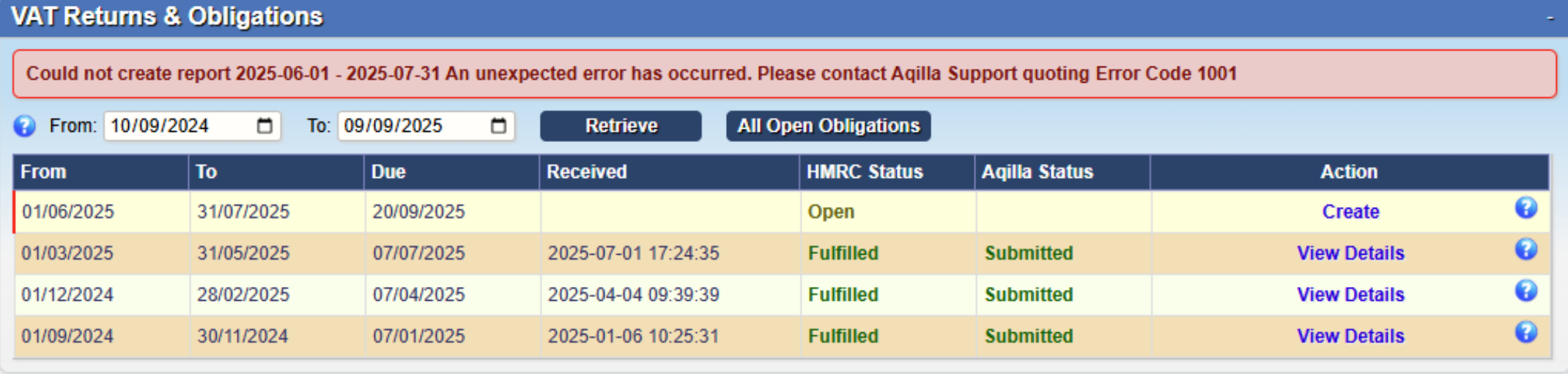
Error Message:
Could not create report YYYY-MM-DD to YYYY-MM-DD. An unexpected error has occurred. Please contact Aqilla Support quoting Error Code 1001
Causes:
-
Non-MTD Report Not Deleted: If a Non-MTD report exists for a VAT period and MTD is enabled, the system attempts to create an MTD report for the same period, causing a conflict.
-
VAT Deregistration: During VAT deregistration, MTD is disabled, and VAT 100 reports are generated locally. If MTD is re-enabled, a new MTD report for the same period as an existing Non-MTD report will trigger the error.
Prevention:
To avoid this issue, users must delete any unsubmitted Non-MTD reports before enabling MTD and generating new VAT submissions.
Resolution:
If the error occurs, it cannot be resolved by the user. Contact Aqilla Support, quoting Error Code 1001, for assistance from the support and development team.